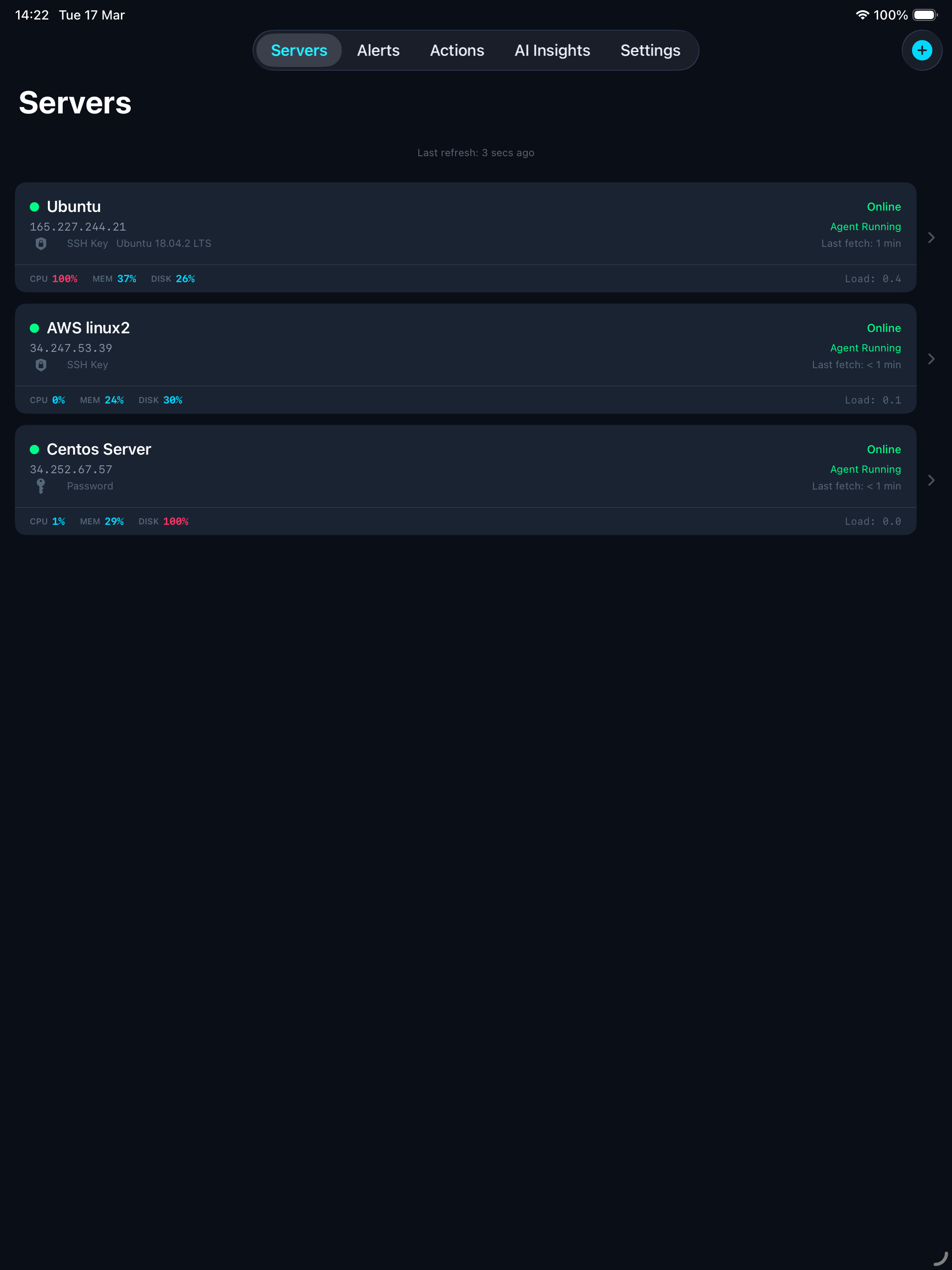
Monitor, protect, and manage your Linux servers from anywhere, your iPhone, iPad, or Mac.
ServerGuardAI keeps an eye on your Linux servers 24/7 and sends you instant alerts when something goes wrong. Check server health, restart services, block suspicious IPs, and get AI-powered diagnostics, all from your device.
A tiny program on your server that sends health data every 2 minutes.
Receives the data, stores it, checks thresholds, and sends you push notifications.
Your dashboard to see everything and take action when needed.
Getting started takes just a few taps. Enter your server’s hostname or IP address and your SSH login details (password or SSH key).
The app connects to your server via SSH, automatically installs the monitoring agent, and starts it as a background service. No terminal commands needed.
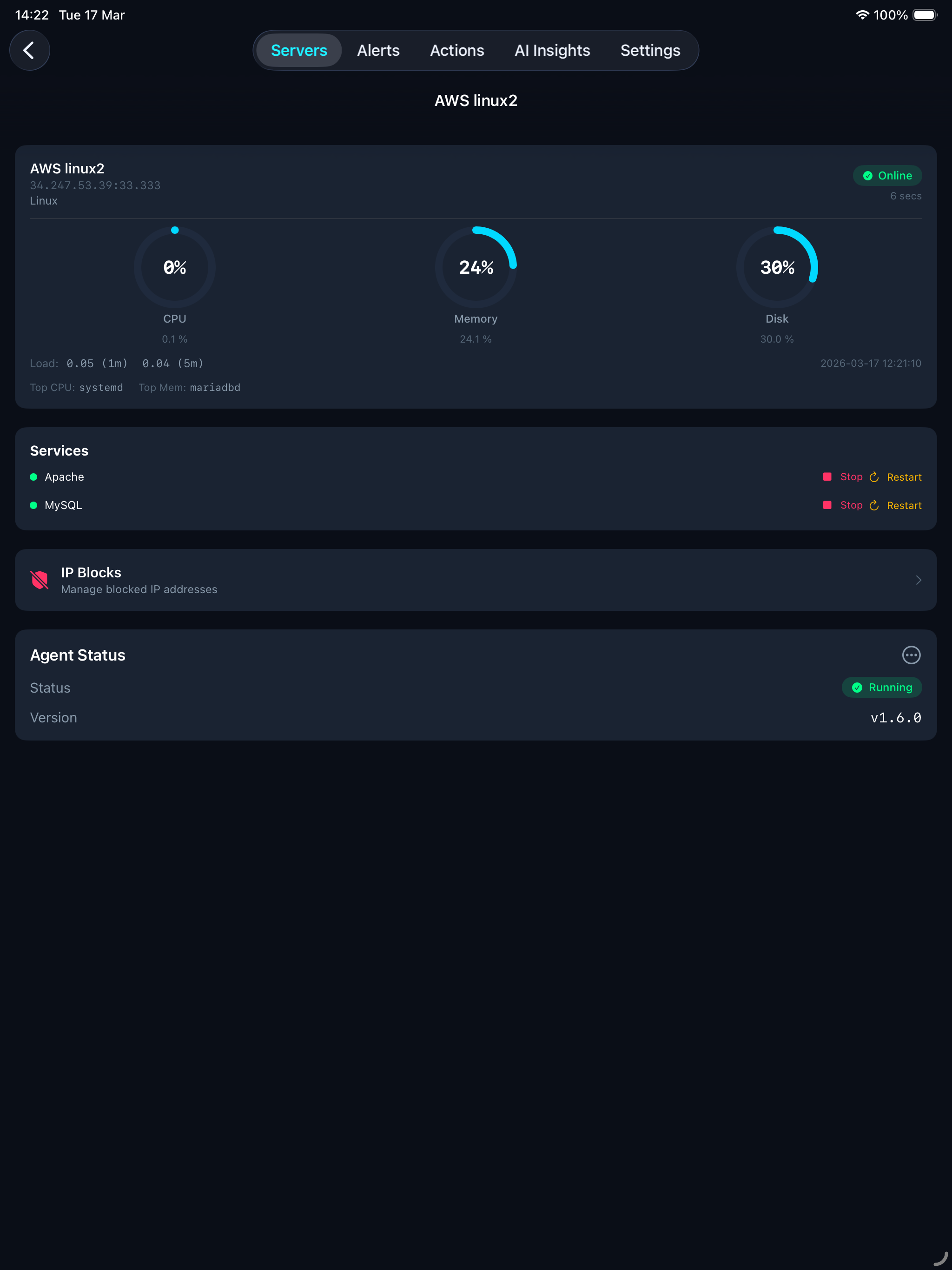
Within seconds of adding your server, live metrics start flowing to your dashboard. Everything you need to know at a glance, updated every 2 minutes.
Start, stop, or restart any service with a single tap, commands run directly on your server via SSH.
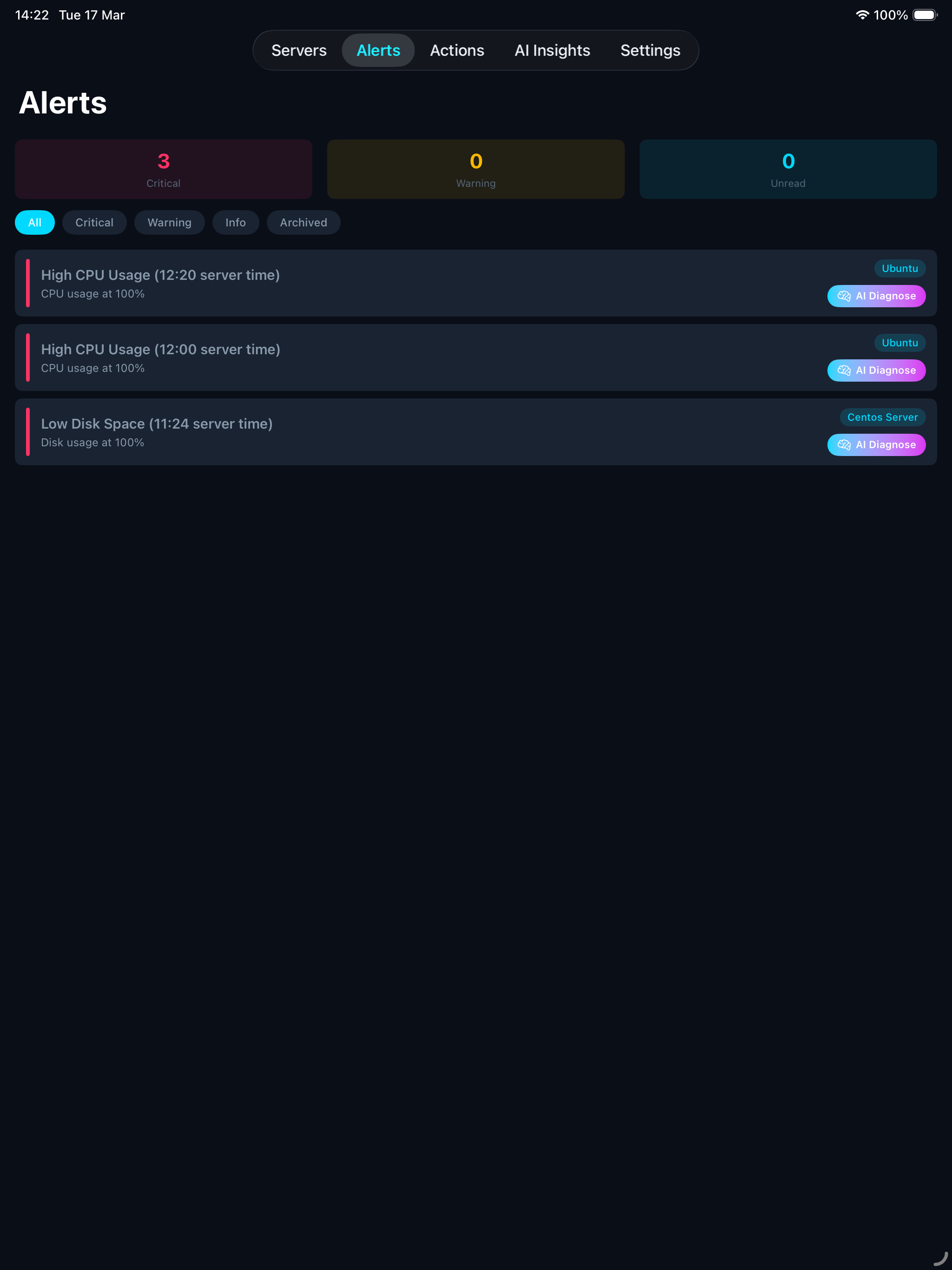
Get notified the moment your server needs attention. Available on all plans, Free gets 100 push alerts, Pro and Agency get unlimited.
Alerts are delivered as push notifications to all your devices. Repeat alerts for the same problem are throttled per alert type, from 5 minutes for crash loops to 24 hours for slow-moving conditions like disk space, so you don’t get spammed. Snooze or mute any alert type per server, set quiet hours, and get a weekly summary you can open and read instead of a notification that goes nowhere.
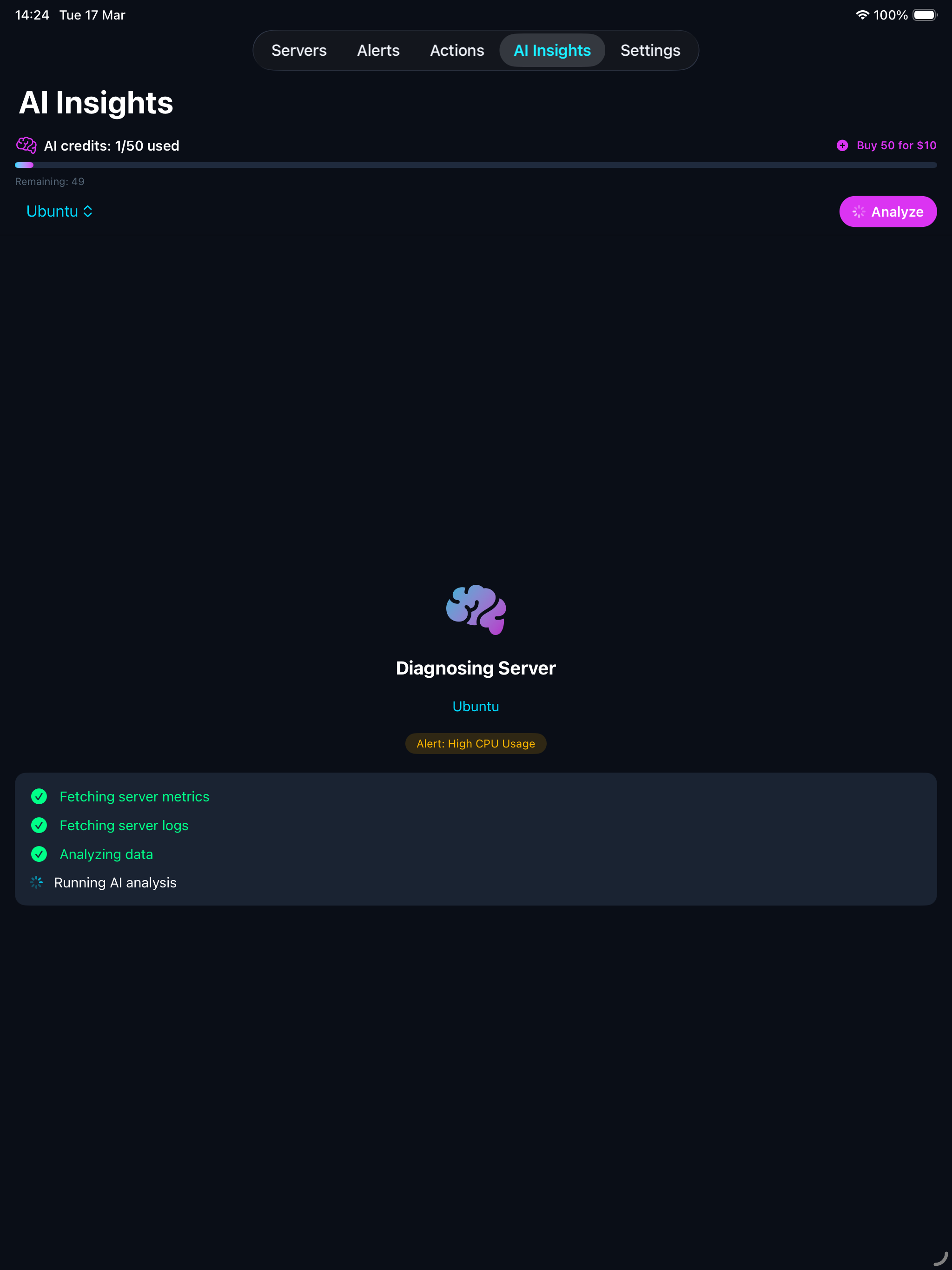
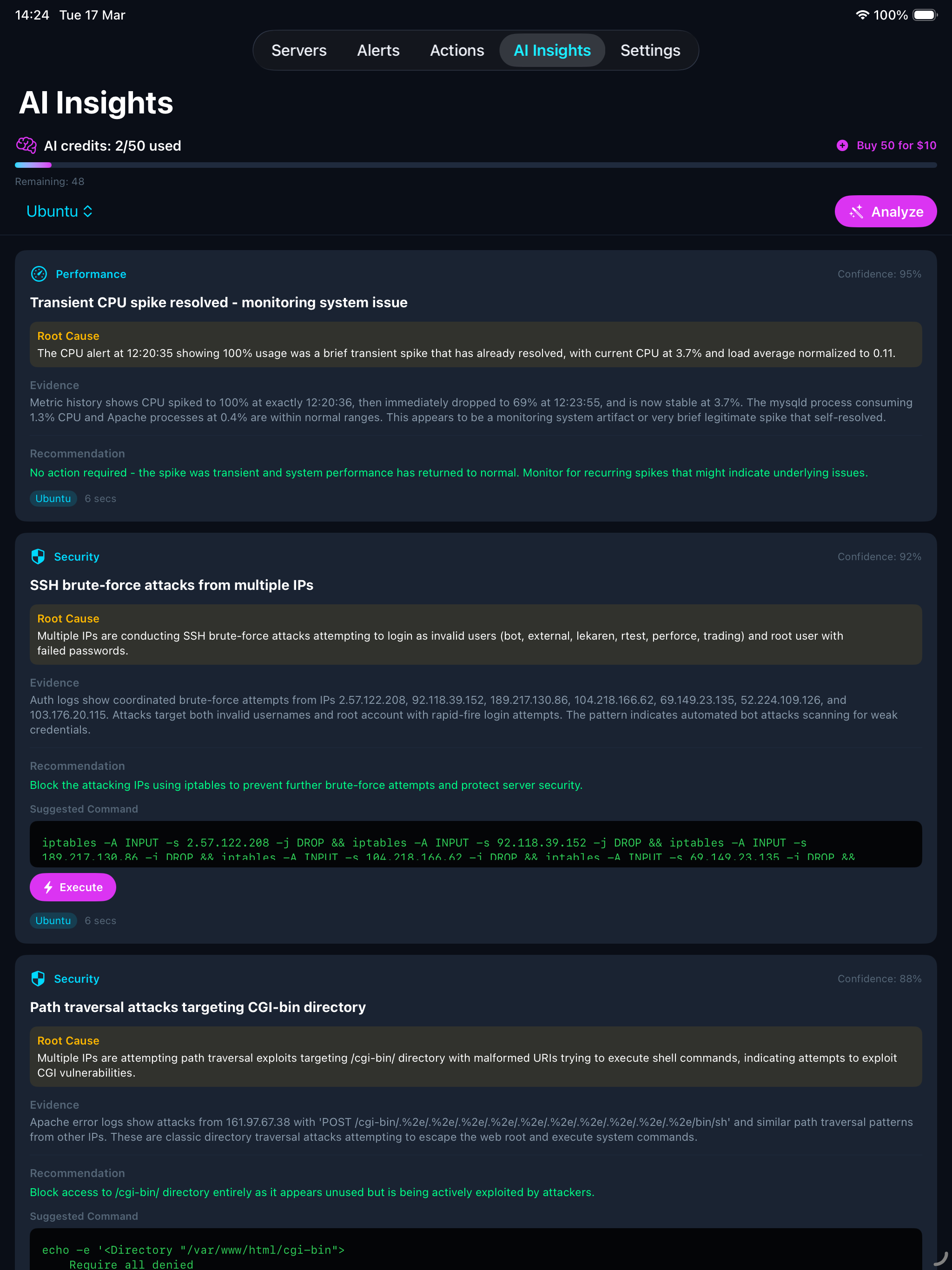
Available on all plans, each analysis uses 1 AI credit. Two ways to ask. Tap Diagnose on an alert and you get one answer: what caused it, the evidence, and the one command that fixes it, with a plain verdict like “flat for a week, not urgent tonight”. Or tap Analyse on a server and the AI examines your metrics, logs, service status, and network connections, then gives you a ranked list you can work through:
Each finding includes a confidence score, the root cause, supporting evidence, and a recommended fix with one-tap execution. The AI also provides verify and rollback commands. You always review the command first, nothing runs without your approval.
Disk full? You get a button that frees the space and tells you how much, not ten lines of advice. It only ever touches logs, journals, caches and crash dumps, never your sites or data, and it says so.
Findings you mark as fixed, expected, or not a real issue stay that way. Free gets 3 credits, Pro gets 10, Agency gets 75, all one-time, not monthly. Additional packs of 50 credits can be purchased anytime on any plan.
Take action on your servers without ever opening a terminal. All commands run directly from your device to your server over SSH.
Built-in safety: Before any command runs, a safety filter blocks dangerous operations like recursive deletes, system shutdowns, and fork bombs. Every action is logged so you have a complete audit trail.
Available on every plan, including Free. Switch it on per server and, every night, the agent checks each website on that server from outside the site itself, where a compromised plugin can’t switch it off or lie to it.
The malware scan, the exposed-file checks and the open admin-tool check run on every PHP site. Plugin inventory, release comparison and hidden-administrator detection are WordPress-specific today; Laravel, Symfony and CodeIgniter equivalents are on the roadmap.
Every scan leaves a receipt. You see what was checked, how many files, and when, not just that nothing was found. If a check didn’t run, you hear about that too. Fix something and the finding closes itself once the next check confirms it. Dismiss something and it stops asking.
The check runs at the lowest priority with a memory cap, at a random time in the early hours. On a 1-core test server with a full WordPress site it finished in about 90 seconds.
Two separate channels: monitoring goes through the cloud, actions go direct.
The cloud API is never involved in actions, it only handles monitoring data and notifications.
Security is designed into how the pieces talk to each other.
The agent only sends data out. It never receives or runs commands from the cloud. No open ports needed on your server.
All data travels over HTTPS with TLS. Everything the agent sends is additionally signed with HMAC-SHA256 to prevent tampering.
SSH passwords and keys are stored in Apple’s Keychain, backed by hardware security. They never leave your device.
Destructive commands (recursive deletes, shutdowns, fork bombs) are automatically blocked. Each server has isolated API credentials generated at setup.
Every agent release is cryptographically signed. The agent verifies the signature before installing, refuses anything unsigned or older than what it runs, rolls out gradually, and rolls back on its own if a release misbehaves.
The nightly check reads your site’s files from the operating system, not from inside the website’s own code. Something running inside a compromised site can’t switch it off or feed it false answers, and the receipt shows exactly what was looked at.
Use ServerGuardAI on your iPhone, iPad, and Mac. Server configurations can be synced across devices via iCloud (push/pull from Settings). All devices see the same live metrics and alerts from the cloud API. SSH credentials are stored securely in Keychain on each device and must be entered once per device.
The same protection on every plan. Tiers differ by capacity.
Additional AI credit packs (50 credits) can be purchased anytime on any plan.
The things you would want to know before letting anything run as root on a server you are responsible for.
A bash agent as a systemd service, running as root because it needs to read every service state and log. It is capped at 128 MB and wakes every 2 minutes. If you turn on nightly checks, a second unit runs once a night at the lowest CPU priority with a 512 MB memory cap and a 4-hour hard stop. Both are plain bash you can read at /usr/local/bin before and after install. Nothing listens on a port.
No. The agent only pushes data out. Restarting a service or blocking an IP goes from your device straight to your server over SSH. Our API never sees the command and has no path to your machine, even if it were compromised.
Every 2 minutes: CPU, memory, disk, load, service states, SSL expiry dates, the top IPs and error lines from your web logs, and the last 300 lines of each error and access log (Pro and Agency). Emails, passwords, tokens and auth headers are scrubbed from log lines on arrival. Nightly checks send file paths, sizes and hashes, which rule matched, and plugin names and versions. Your files are never uploaded.
Raw metrics 6 hours, 10-minute averages 3 days, hourly averages 90 days. Alerts 30 days. Log snapshots are overwritten every 2 minutes, so only the newest copy ever exists. Deleting a server in the app deletes everything stored for it.
curl, jq, openssl and awk if they are missing, through your package manager, plus a small signature-verification binary for updates. It never installs wp-cli or anything inside your websites, and it never changes your firewall.
Yes, from signed releases only. It verifies the signature, refuses anything unsigned or older than what it runs, rolls out gradually and rolls back on failure. Switch it off per server in the Security screen and update by hand whenever you prefer.
Measured on a 1-core, 1 GB server running a full WordPress site: about 90 seconds, under 10 MB of memory, and page response times went from under a millisecond to a few milliseconds while it ran, then back. It runs at the lowest CPU priority, is memory-capped, and is off by default until you turn it on for that server.
Mark it as expected and it never asks again, and you can undo that any time. The detection rules were measured against 815,000 PHP files on 103 production sites before shipping, and five plausible-looking rules were deleted for false positives. Findings that cannot be confirmed are shown as warnings and never send a push.
For monitoring, yes: the agent only makes outbound HTTPS connections, so NAT, Cloudflare and firewalls do not get in the way. Inside a container it reports host-level metrics. For actions, your device needs to reach the server over SSH directly. Jump hosts are not supported yet.
Ubuntu, Debian, AlmaLinux, Rocky, CentOS and Amazon Linux 2023, on x86_64 and arm64. Older systems such as Amazon Linux 2 run the monitoring agent but cannot run the nightly check. Linux only, no Windows.
Thresholds are fixed and tuned against real servers to avoid noise: CPU, memory and load need three consecutive breaches over six minutes before anything fires. You can mute or snooze any alert type per server, set quiet hours, and choose which severity levels are allowed to push.
The agent queues metrics and alerts locally and sends them when it can reach us again, so history fills back in. Everything you do from the app over SSH is unaffected. We never report our own outage as if it were your server going down.
Anyone with SSH access to a server can add it and receive the same alerts alongside you. iPhone, iPad and Mac today; there is no Android or web version. Read-only sharing by invite code and Slack delivery are the next release.
The agent, the nightly scanner and the installer are plain bash. They sit on your server at /usr/local/bin after install, and the identical files are served from api.serverguardai.com/downloads so you can read them first. The app and the API are not open source.
Download the app, add your server, and see your first dashboard, the agent installs automatically.
Everything you need to know before getting started.
Any Linux server you can SSH into, Ubuntu, Debian, CentOS, AlmaLinux, Rocky Linux, and more. The agent is a lightweight bash script with no special dependencies.
No. The agent uses minimal resources, it runs for a fraction of a second every 2 minutes to collect metrics, then sleeps. It’s designed to be invisible.
Automatically. When you add a server in the app, it connects via SSH, installs the monitoring agent, and starts it as a background service. No terminal commands needed.
Yes. Anyone with SSH access to a server can claim it using the server’s API key. The original owner keeps full ownership, and the new user gets shared access to view metrics and alerts.
Yes. Monitoring data (CPU, memory, etc.) is stored securely on our cloud API. SSH credentials never leave your device, they’re stored in Apple’s Keychain, backed by hardware security, and are never sent to our servers.
The agent continues running and sending data. If you reinstall the app, your servers will sync back from iCloud. You can also remove the agent from any server at any time via SSH.